How to run VLC player as root user

I ran into this a while back when I needed VLC running as root on a headless server, and the usual --no-sandbox flag didn’t cut it. VLC refuses to start as root by default, which makes sense from a security standpoint but is annoying when you actually need it. The fix is brutal and hacky, but it works: sed -i 's/geteuid/getppid/' /usr/bin/vlc What’s actually happening here? VLC’s startup script checks whether the effective user ID is zero (root). If it is, it bails out. By swapping geteuid with getppid, we’re telling the script to check the parent process ID instead of the effective UID. Since getppid() returns a number way bigger than zero, the check passes and VLC starts. ...
18 May 2020 · 1 min · 168 words · Shafiq Alibhai

Update all globally installed npm packages at once

I keep meaning to run this but always forget the flag. There’s no npm update-all or anything – it’s just: npm update -g The -g tells npm to operate on the global package registry instead of the local node_modules. Without it, npm update only touches packages listed in your project’s package.json, which is the default behaviour and what you want most of the time. One thing to bear in mind: npm update won’t bump you to a new major version, even if one’s available. It respects the semver range in whatever pinned your package – so if you installed commander@2.x and 4.x is out, you’ll stay on 2.x. If you actually want to upgrade majors, you need to be explicit: ...

22 December 2018 · 1 min · 148 words · Shafiq Alibhai

'Decoding the Error: StatusCode=0 "ReferencedResourceNotProvisioned" in Azure'

Introduction If you’re working with Azure, you might have seen an error like this: “Failure sending request: StatusCode=0 — Original Error: Code=‘ReferencedResourceNotProvisioned’ Message=‘Cannot proceed with operation because resource used by resource is not in Succeeded state. Resource is in Updating state and the last operation that updated/is updating the resource is PutSubnetOperation.’” It looks worse than it is. Here’s what it means and how to fix it. Why Does This Error Occur? A related resource is stuck in an ‘Updating’ state, so Azure won’t let the operation proceed. This usually means another operation is still running on that resource or one it depends on. ...

22 December 2018 · 1 min · 140 words · Shafiq Alibhai

Import a Resource to a Terraform Module

Importing an existing AWS instance into a Terraform module is straightforward, but the syntax trips people up because you need to specify the full module path. terraform import module.foo.aws_instance.bar i-abcd1234 The format is module.<module_name>.<resource_type>.<resource_name>, followed by the resource ID. In this case, foo is the module name, aws_instance is the resource type, bar is the resource name inside that module, and i-abcd1234 is the AWS instance ID. Once imported, Terraform will manage the instance and track any configuration drift going forward.

24 October 2018 · 1 min · 81 words · Shafiq Alibhai

Terraform Modules in Subdirectories

Terraform modules are usually at the root of a repository. Sometimes they’re nested in a subdirectory, and you need to point Terraform at the right one. Terraform handles this with a double-slash (//) in the source path. Everything after the // is treated as a subdirectory within the package. How It Works The syntax is straightforward: module "consul" { source = "hashicorp/consul/aws//modules/consul-cluster" } The hashicorp/consul/aws part is the module registry path. The //modules/consul-cluster tells Terraform to look inside that package for the actual module. ...

24 October 2018 · 2 min · 309 words · Shafiq Alibhai

Merging Unrelated Git Histories

You’ve got two repositories with completely separate histories, and you need to bring them together. Maybe it’s an old project you’re absorbing into a new one, or a submodule that started life as its own thing. You try a standard git merge and Git immediately shuts you down: fatal: refusing to merge unrelated histories This isn’t a bug – it’s Git being cautious. When two branches share no common ancestor, Git assumes you’ve made a mistake and refuses to play along. But sometimes you genuinely want this merge, and there’s a flag for that. ...

4 September 2018 · 2 min · 292 words · Shafiq Alibhai
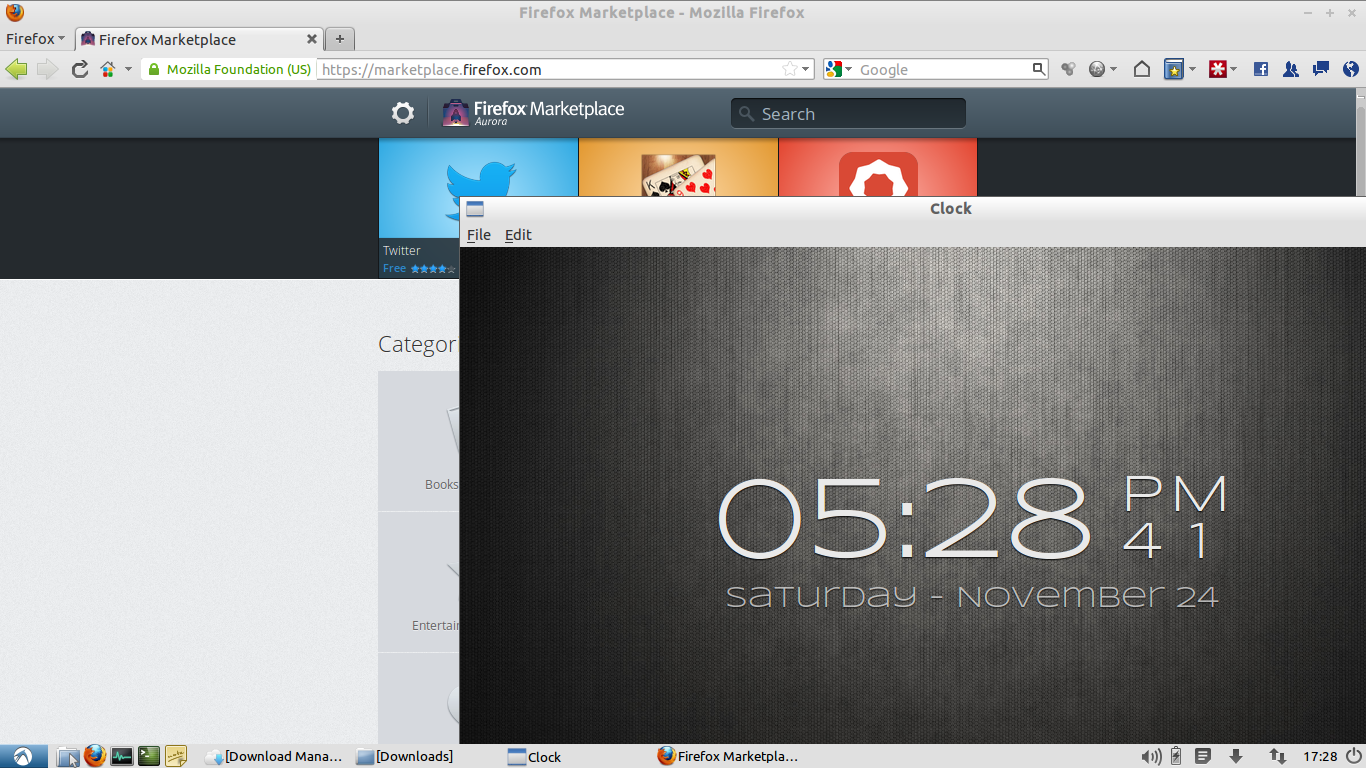
Firefox OS Clock app running on Ubuntu with Firefox Marketplace in the background

Running Firefox OS apps on Ubuntu Linux

Mozilla announced Firefox OS back in 2011 under the codename Boot2Gecko, and since then the project has gone from a concept to something you can actually run on your desktop. I’ve been following it closely and finally got around to setting it up on my Ubuntu machine. Here’s how. What is Firefox OS? Firefox OS is Mozilla’s attempt at building a mobile operating system entirely from web standards. There’s no Java, no native SDK, no proprietary frameworks. The entire user interface – called Gaia – is built in HTML, CSS, and JavaScript. The rendering engine underneath is Gecko, the same one that powers Firefox. And at the bottom, it runs on a Linux kernel. ...

24 November 2012 · 5 min · 927 words · Shafiq Alibhai

Replacing an IP address with sed

Sometimes you need to swap an IP address out of a file. Maybe you are moving a server to a new host, updating a config, or just tired of grepping through logs to find the old address. Whatever the reason, sed makes it trivial. The trick is matching the dotted-decimal pattern. An IP address is four groups of numbers separated by dots, so the regex needs to capture that structure. Here is the one-liner: ...

20 June 2011 · 2 min · 237 words · Shafiq Alibhai

Disable services in Solaris 10

Managing services on Solaris 10 is nothing like Linux. There are no /etc/init.d/ scripts, no service command, no chkconfig. Instead, Solaris uses SMF — the Service Management Facility — and everything goes through svcadm. If you are new to Solaris, this can feel unnecessarily complicated. It is not, once you learn the pattern. Disabling a service You need root privileges or sudo access. The command is: svcadm disable network/cswpuppetd:default The argument is the service FMRI (Fault Management Resource Identifier). For Puppet installed from OpenCSW, the FMRI is network/cswpuppetd:default. The :default part refers to the default instance of the service. Some services have multiple instances, but most only have one. ...

23 May 2011 · 3 min · 428 words · Shafiq Alibhai

Puppet logs on Solaris 10

Puppet on Solaris 10 stores its logs in the SMF log directory, which is different from the /var/log location you might be used to on Linux. If you are looking for the usual log files and cannot find them, this is probably why. Agent logs The Puppet agent (puppetd) runs as an SMF service, and its log is at: /var/svc/log/network-cswpuppetd:default.log To watch it in real time: tail -f /var/svc/log/network-cswpuppetd:default.log Master logs The Puppet master (puppetmasterd) follows the same pattern: ...

19 May 2011 · 2 min · 257 words · Shafiq Alibhai